Placeholder for React Native TextInput

For input boxes, we use labels to tell the user about the info to enter. We already saw floating label text input where a floating label is present for the input box.
But what if you don't want to use any label and want just a plain text input? In that scenario, we will use just a text input placeholder to tell the user about the content to enter.
To add a placeholder, just add a placeholder prop to the input with a string value. We can also use placeholderTextColor prop to change the color of the placeholder.
Lets see with an example.
Create A New Project
Create a new react-native project by using npx. Check documentation for creating a new react native project.
npx react-native@latest init TextInputRN
Example Implementation
We will create a simple name text input.
Import the TextInput component in the App.tsx file and add basic required props for the name input.
Add placeholder prop with a string value and also add placeholderTextColor prop for placeholder color.
//App.tsx
import { TextInput } from 'react-native';
...
<TextInput
  style={styles.input}
  keyboardType='default'
  autoCorrect={false}
  autoCapitalize="none"
  placeholder='Enter Name'
  placeholderTextColor='gray'
/>
...
Run the app,
#for Android
npx react-native run-android

#for ios
npx react-native run-ios
After the render, you will see a text input with a placeholder with gray color.
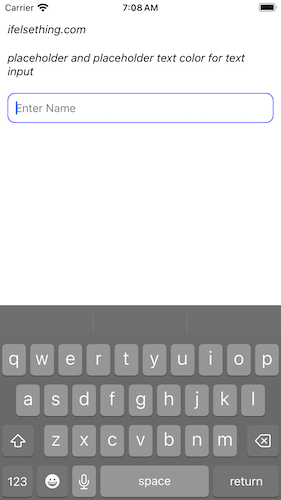
Please note that the placeholderTextColor prop is different from the font color of the input.
...
<TextInput
  ...
  style={styles.input}
  placeholderTextColor='green'
/>
...
input: {
  ...
  color: 'purple'
}

Complete code of our example,
//App.tsx
import React from "react";
import {
  Text,
  StyleSheet,
  TextInput,
  SafeAreaView,
  StatusBar,
  View
} from "react-native";

export default function App() {
  return (
    <SafeAreaView style={{ flex: 1, backgroundColor: 'white' }}>
      <StatusBar
        barStyle="dark-content"
      />
      <View style={styles.container} >
        <Text style={styles.text}>
          ifelsething.com
        </Text>
        <Text style={styles.text}>
          placeholder and placeholder text color for text input
        </Text>
        <TextInput
          style={styles.input}
          keyboardType='default'
          placeholder='Enter Name'
          placeholderTextColor='gray'
          autoCorrect={false}
          autoCapitalize="none"
        />
      </View>
    </SafeAreaView>
  );
}

const styles = StyleSheet.create({
  container: {
    flex: 1,
    margin: 10,
    gap: 20
  },
  input: {
    borderColor: 'blue',
    borderRadius: 10,
    borderWidth: 1,
    fontSize: 15,
    padding: 10,
    color: 'black'
  },
  text: {
    fontSize: 15,
    color: 'black',
    fontStyle: 'italic'
  },
});
Related Posts
 Select Text of React Native Text Input
 Keep React Native Keyboard Open Even After Submit
 Keyboard Key Press Events of React Native TextInput
 Disable Return Key on Empty TextInput
- How to Auto Focus on React Native TextInput?
 Get Value of React Native TextInput
- How to get Keyboard Metrics without Using Events in React Native?
- How to Automatically Focus on Next React Native TextInput?
- Get Event After Keyboard Opened or Closed in React Native